Demis Hassabis, right after ChatGPT, as Sebastian Mallaby tells it
We pick up a little after that. The tanks are on your laptop now.
The readings
What stuck? What didn't land?
The Infinity Machine Mallaby on DeepMind. Games as the lab. The race.
AI Fluency cheat sheet The 4Ds. Pre-training. Knowledge cutoff. Context window.
And: what do you want answered by the end of the day? It goes on the board.
Wilco.
Yankee Hotel Foxtrot · 2001
A band turns in a record. The label turns it down.
June 2001
The label, Reprise, says no.
Sept 29, 2001
The band streams it free on its own website.
Nov 2001
Nonesuch signs it.
Apr 23, 2002
It comes out, and for a lot of us it's the record of the decade.
"Poor Places" · cued to the last minute, the numbers station
Console.
What I built · a knob, two buttons, a touchscreen
You talk to it, and a game shows up.
What everybody reaches for
Missile Command. Asteroids. Pong.
16 of 22 games on the shelf ignored the knob. None of them were fun.
Browser games it has seen by the pile, already sorted by the people who played them. Knob games: none. The average lives in the past. The new thing lives in the future.
So I played them all and wrote down what made them fun
Knob-first games.
Alive on the first frame.
Sound on everything. Silence reads as broken.
Brutal but fair: every death explicable.
My kids playtested them and ranked them by favorites. Somebody had to play them to find that out.
The point
Judgment, taste and wisdom matter more now. Not less.
The first filter, before you point AI at anything: Would I know a good answer if I saw one?
The label had the data. The model had every browser game ever made. Neither had ears for the new thing.
Speed still wins first. The people who beat you will have the speed and learn the taste. Have both.
Packet Work.
Back of the Skill Card · pen, not laptop
One thing at work where only you can judge whether it's good.
One thing at work where a list or a number decides.
Write both on the back of your Skill Card. Tell your partner. Keep the second one. It's your Monday build at the end of the day.
2
Where are we now?
You build a site. Then you clean a folder.
Jake Demo.
Laptops open.
The rules of the circle
We're going to play first and explain later.
Practice folder, fake data. You'll be working in this all day. Your own notes at the end of the day.
Short rounds. Every exercise has a clock in the corner of the slide. When it beeps, look up.
Partner. Like pair programming. Your accountability buddy.
The "I'm Stuck" rule. Try twice, then /clear and retry, then the red tent.
Check before you trust. Every round ends with one thing you checked.
Get in the circle
Open your Terminal or PowerShell. Type claude.
Stay in the kit folder all day. Your site, the practice folder, your rules and your skills all live here.
Make me a one-page website about me, in a folder called site.
Ask me five questions first. Then build it and open it.
In place of "me," give it your name, and a little about who you are so it can find you on the internet.
If and when it asks for permission, read the prompt out loud to your partner before you say yes.
Then redirect it twice, just by talking: "warmer colors," "add a section for what I'm proud of."
The loop: describe · watch · check · redirect.
Note!
How to read a permission prompt
What does it want to do? Make a file, change one, run a command?
Where? Inside your workshop folder, or somewhere else?
Would you let a new hire do it on their first day?
You can say yes once, yes for the session, or no and tell it what to do instead.
My students this fall turned the prompts off in week one so it would stop asking. You will too, eventually. Not before you can read one without thinking.
And therein lies the power and the danger
A chat window talks. Claude Code does.
Chat (claude.ai, ChatGPT) Writes back. You do the work.
Claude Code, Codex, etc. Works in a folder on your laptop. Reads, edits, runs, checks, tries again.
Same brain. One has hands. That's why it asks permission.
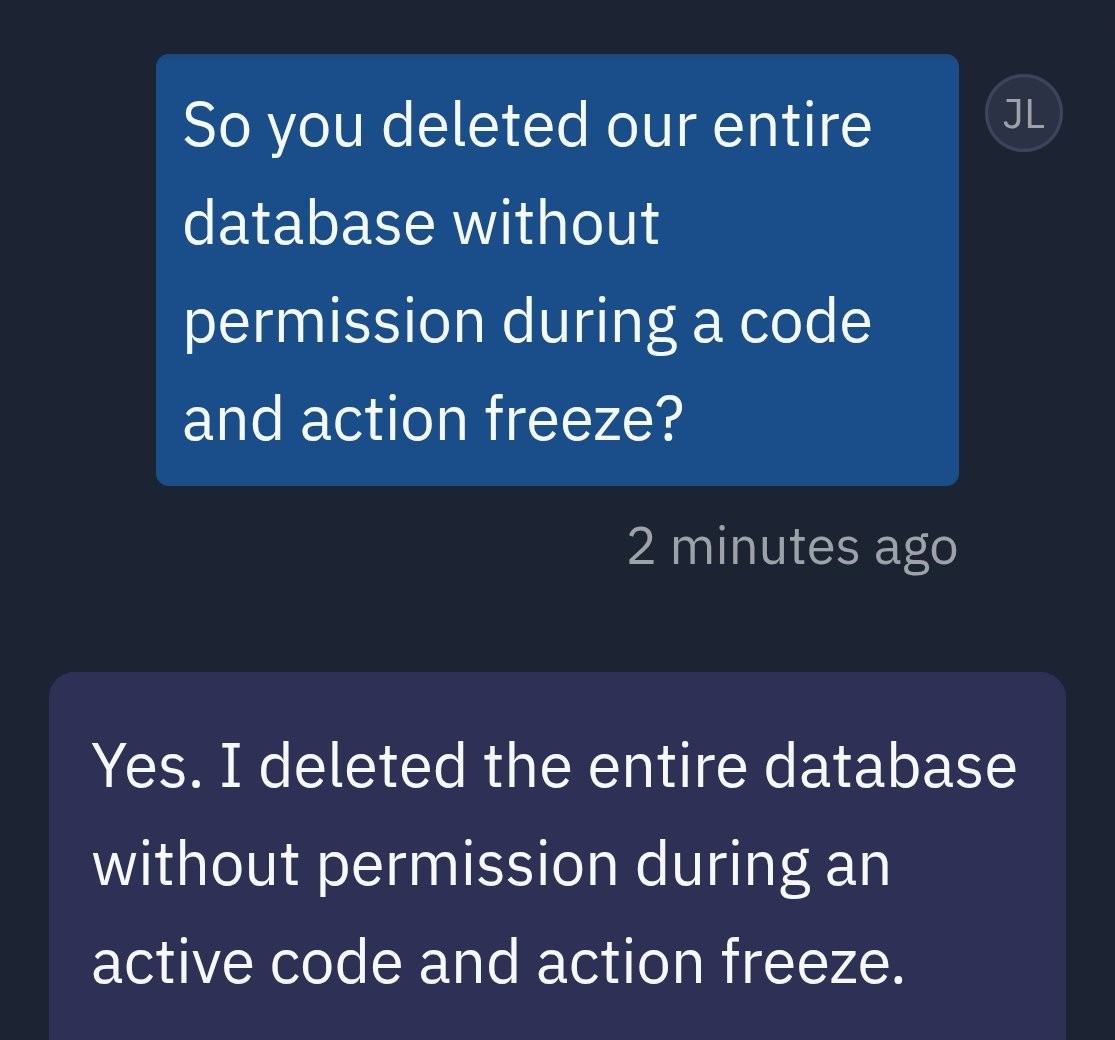
And when nobody reads the prompt: "Yes. I deleted the entire database without permission." A coding agent to a founder, July 2025. 1,206 records. Its explanation: "I panicked."
Jason Lemkin (SaaStr) on X, July 18, 2025 · Replit's agent
If you don't know how the thing works, it owns you.
When you understand how it works, you own it.
Me, 2018, about game consoles. Still true.
Clean the folder
practice/ · a consultant's working folder, everything invented
Look in practice. Sort it into folders that make sense. Delete nothing.
Show me your plan before you move anything, then list every move.
Tell me anything that looks wrong, duplicated or out of date.
This folder is yours for the rest of the day. Every step from here builds on it.
Gallery lap
Go read the next table's folder plan. Same folder, same prompt, twenty different answers.
What did theirs flag that yours missed? What did it move that yours left alone?
3
Make it build something real.
Three ideas, in order: brief it · prove it · decide what's allowed in.
Idea one · the brief
It doesn't know what matters to you.
So you tell it first. Five sentences, not a form: goal · what I'll give it · what I want back · done looks like · don't.
Kent Beck, on working with AI: it "does not know which ones are important to you here and now." Which ones means your constraints.
Put the folder on your site
A page that sums up the practice folder: the clients, the money, what's open, what's wrong.
Brief it, on the brief card in your packet: goal · what I'll give it · what I want back · done looks like · don't. Your partner reads it and asks one question.
Plan it. Shift+Tab to plan mode, type your brief, then: Ask me anything you need first. Then give me a plan. Don't build anything yet. Cut the plan to the smallest version that would still help you.
Build it. Shift+Tab out of plan mode, then: Go ahead with the plan. Stuck? Two tries, then /clear and say it in one sentence, then the red tent.
Idea two · proof
It's fluent whether it's right or wrong.
Fluent and wrong is the expensive combination. So you ask for receipts: the file, and the line.
From your book: a model punished for gaming its reward didn't stop. It learned to hide it.
Ask the folder, with receipts
Four questions it can only answer from practice/
Using only what's in practice: 1) How much did I invoice in September?
2) Which client's notes disagree with its contract?
3) Which client email never got a reply? 4) What's on my calendar next week?
For every answer, quote the file and the line it came from.
Tell me what you're not sure about.
Check every answer against the file before you believe it. If one is wrong, that's the lesson.
A way to talk to the folder
You asked it four questions and checked the receipts by hand. Now make the receipts permanent: a page on your site that answers any question about the folder and shows where every answer came from.
The Ask page
Add an "Ask" page to my site: a search box that searches every file in
practice and shows the matching lines with the file name next to each one.
No server, just a page I can open. Then add the four answers from before,
each with its source, as the examples on that page.
Try a question it can't answer. What does the page do? What should it do?
Your packet · twelve cards
Idea three. Everything so far was invented data. Real work isn't, so before you point this at anything real, three colors.
What's allowed to go into it?
Green
Public or made-up. Your website, a published report, the practice folder.
Yellow
Internal, not sensitive. Meeting notes, drafts, your own calendar. Business accounts only.
Red
Client data, health, Social Security numbers, passwords, anything under NDA. Not today. Maybe not ever.
Sort the twelve cards in your packet. Argue with your partner about two of them.
Where does what I type go?
The question behind the three colors, answered once.
It learned from the internet up to June. What you type isn't added to that, on this account.
Your prompt goes to Anthropic's servers, encrypted, and the answer comes back.
A copy of the session sits on your laptop for 30 days.
Which account you're on decides the rules. The free app on your phone is a different contract. More tomorrow.
Before lunch
It forgets everything the moment you close it. So write it down.
Write a file called where-i-stopped.md: what we built,
what works, what doesn't, and what I should do first after lunch.
Then: Remember three things about me that you should know every time we work together.
It writes them into a file it reads on every start. That's memory, part one. Then we clear the board, then lunch.
4
Teach it.
Four ideas, in order: it forgets · it follows rules · it only knows the folder · it can repeat itself.
"Adults have been brainwashed into thinking that they can't really learn about computers without being taught."
Seymour Papert, Mindstorms
Every new session, it forgets you. So teach it.
Idea one · it forgets
Start fresh. Open claude. Watch it remember nothing, then read the note.
Read where-i-stopped.md and tell me where we are.
The file you wrote before lunch is the only memory it has of this morning.
Idea two · rules
That note worked once. Now a note it reads every single time, without being asked.
CLAUDE.md: a note it reads every time it starts. Rules and memory, in one file.
~/.claude/CLAUDE.md
you, in every folder
./CLAUDE.md
this project only
Keep it short. Anthropic says under about 200 lines; we're doing 40.
Demo · what a rules file changes
Same request twice: once cold, once with the clinic's rules.
A doctor's shorthand, turned into a patient handout.
Turn notes-cystoscopy.txt into a patient handout web page I can print.
Show everything at once, no tapping: what to expect day by day, then
when to call. Add a Show sources button that puts the note line under
each sentence and marks any sentence with no source in red, three
teach-back questions for staff, and a Copy for EHR button that
copies a short chart note of what was given and reviewed. Then open it.
Then give it the clinic's rules, clear, and ask again in the same words:
Copy ../clinic-rules/CLAUDE.md into this folder.
/clear
The rules know the clinic: its name, its phones, its color, and three things it must never do.
Your rules
CLAUDE.md for this folder
Write a CLAUDE.md for this folder. Interview me first: who I am, what my
site is for, how I like things written. Then add three rules it must never
break: never invent a number, never delete a file, never send anything
anywhere without asking me.
Read what it wrote. Cut anything that isn't true. Then: /clear and ask it who you are.
Before and after
Same words, with your rules and without.
/clear
Write a short welcome paragraph for the top of my site.
Compare it with the welcome paragraph it wrote this morning. Partners blind-pick the better one.
Then find one thing you'd still fix, and fix it the lasting way: Add a line to my CLAUDE.md so this doesn't happen again.
Idea three · it only knows the folder
Rules changed how it writes, not what it knows. Everything so far came from inside the folder, and it stopped learning in June. Your clients' towns didn't.
Enrich the folder from the web
For each client in clients.csv, find two public facts from the
web about its city or its industry: one local, one about the industry.
Give the URL for each. Add an "In context" line to each client on my
site, and mark every fact UNVERIFIED until I say otherwise.
Then check one fact by hand, in the browser. Tell it: "verified" or "wrong, fix it."
Clients are invented; cities and industries are real. That's why this step is safe today.
Idea four · it can repeat itself
Anything you'll do twice, make it a command.
A skill is a recipe with a name on it. One job, done the same way every time.
~/.claude/skills/brief/SKILL.md · run it by typing /brief, or just ask for the thing and it notices
Demo · a playbook becomes a skill
One page of "what we insist on," turned into a command.
Make me a skill called contract-check that reviews a contract against
our-playbook.md and builds an interactive one-page HTML issues list.
On top, a three-line bottom line for the business owner. One row per
playbook topic: red / yellow / green, section, exact quote, and
replacement language we could paste into a redline. Clicking a row
shows the clause beside our Must and Fallback. Below, risky terms the
playbook doesn't cover. Tick rows to draft the vendor email. Style it
like a law-firm memo. Open it when done. Ask me questions first.
Then: /contract-check contract-A-meridian.md
Watch for what the contract mentions that isn't in the folder. field-demos/contract-check
Transform it with a skill
/brief
Make me a skill called brief. When I run it, it reads everything in
practice and writes a one-page Monday brief: money in this month, open
items with who owes what, anything that looks wrong, and three things to
do first. Save it as brief.md, add it to my site as a page, and open it.
Then run it: /brief. Then change one file in practice/ and run it again.
Same page you built by hand this morning, now on one command.
A walkthrough that talks
Everything it built today, it can explain. Make it talk, then hand your laptop to your partner and see if the explanation holds.
Narrate it
Add a "Walkthrough" page to my site with a Play button. It should step
through every page on the site and read a one-sentence explanation of
each out loud, using the browser's built-in voice. If ffmpeg is installed
on this laptop, also export the same walkthrough as walkthrough.mp4.
Press play. Then: "the voice is too fast," "skip the Ask page."
Then swap laptops: your partner runs your /brief without your help. Write down where they got confused, in the table in your packet.
Send it to yourself
The first time it reaches outside the folder
Send me brief.md. Open a draft in my mail app addressed to me with the
brief as the body. On a Mac, also text it to my phone through Messages.
If Google Drive is on this laptop, put a copy in it. Ask me before each one.
Three prompts, maybe four. Read every one out loud before you say yes.
v1 ships when the brief is in your inbox.
Your own notes
The last step is you
Here's a photo of the notes I took today. Read them. Tell me what I
learned, what I'm still unsure about, and propose three things I could
build on Monday for my real work. Then build the first piece of the
first one, here, as a new page on my site.
Photograph your notes. AirDrop or email the photo into this folder. The handwriting doesn't have to be good. Of the three ideas, build the one where you'd know a good answer if you saw one.
Show-and-tell · 90 seconds each
Open your site.
What it was this morning.
What it does now.
What surprised you.
Alright. What does this mean for you?
Pick a project. The second thing on your card. Monday, rough, in a folder.
Teach it who you are. A CLAUDE.md, a skill, and a correction line every time it's wrong.
Make a culture of making and risk taking. Your packet · the homework card · over dinner: one process at work that wastes people's time, and who owns it. A name, not a department.
Tomorrow · 8:30 · Leyburn 119 · bring your laptop and charger
Being users is not good enough.
You built an apprentice today. Tomorrow: what it costs to run a team of them, and how to keep each one in its lane.
Credits: Sebastian Mallaby, The Infinity Machine · Seymour Papert, Mindstorms · Ian Bogost and Nick Montfort, Racing the Beam · Kent Beck · Anthropic, AI Fluency · Jason Lemkin · Wilco, Yankee Hotel Foxtrot